
Send us your Account and App Information
Having a technical issue or an issue with your membership?
When you email us from Get Help on the TYT.com website or TYT app, the email will automatically include technical details that will help us to resolve your issue faster.
To Email us from Get Help:
- Go to https://tyt.com/settings/help/email or select your Profile Picture in the upper right corner and select Get Help.

- Then select Send us an Email.

-
Enter a Subject and a Description of your issue.
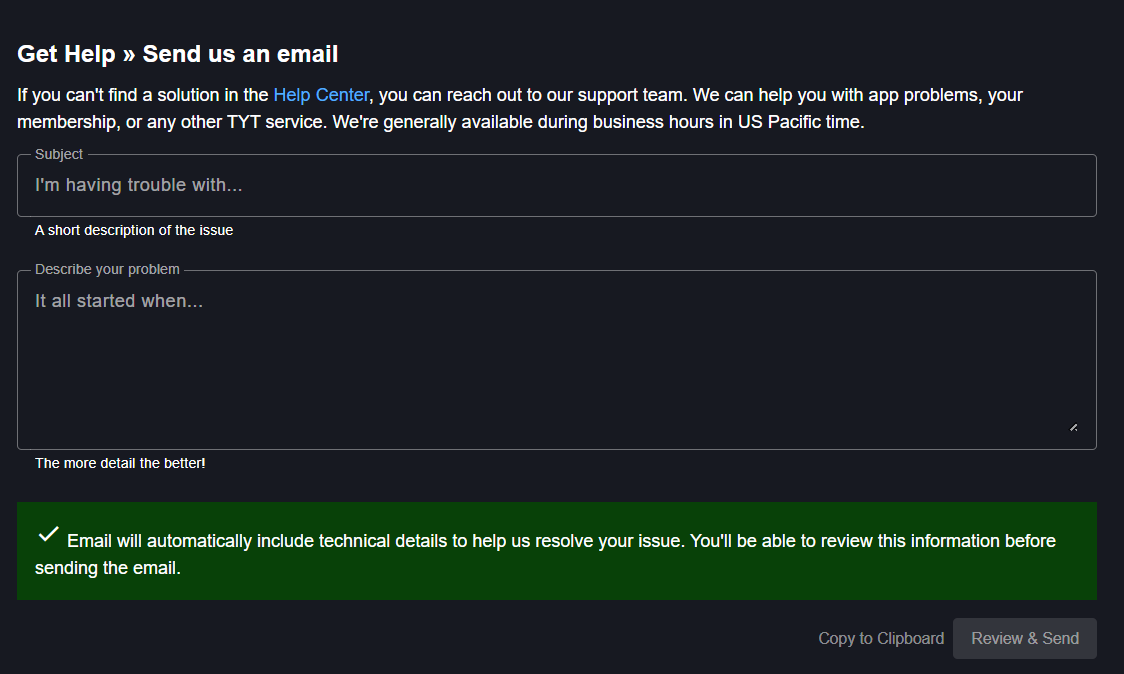
- Select the Review and Send button.
- If your email client isn't opening, you can Select the Copy to Clipboard button. Then, go to your preferred email client and right-click to Paste. Send the email to support@tytnetwork.com.
If you prefer not to use the Send Us an Email feature, or it isn't working for you, please use the Account and App Information button to copy the information to your clipboard.
To Copy technical information to include in your own email:
- Go to https://tyt.com/settings/help/email or select your Profile Picture in the upper right corner and select Get Help.
- Select the Account & App Information button.

-
Select the Copy to Clipboard button.

- Go to your email client and right-click to Paste the Account and App Information into your email. Send the email to support@tytnetwork.com.
